How to Choose the Best Capacitive Touch Screen for Your Needs?
Choosing the right capacitive touch screen can significantly impact your device's user experience. A capacitive touch screen uses the electrical properties of the human body, making it highly responsive. However, not all capacitive touch screens are the same. Some might not meet your specific needs, leading to frustration in usage.
When assessing options, consider the screen size and resolution. A larger screen may enhance visibility but could reduce portability. Touch sensitivity is also critical; a screen that is too sensitive may register unintended touches. Additionally, look for durability features. A less robust screen could fail under everyday wear and tear.
Remember that price often reflects quality, but it's not the only factor. Cheaper options may seem appealing, yet they can lack reliability. Thoughtful evaluation of your specific requirements, such as environment and usage frequency, is essential. Balancing these aspects will help you choose a capacitive touch screen that not only meets your needs but also enhances your overall device experience.

Understanding Capacitive Touch Screen Technology
Capacitive touch screens have become essential in our technology-driven world. They use conductive touch technology to detect finger movements. This results in high responsiveness and clarity. A recent report from Allied Market Research indicates the global capacitive touch screen market is expected to exceed $33 billion by 2027. Factors like growing smartphone and tablet sales drive this growth.
When choosing a capacitive touch screen, consider what you need it for. Touch sensitivity, display quality, and durability are crucial factors. A screen with higher sensitivity allows for effortless navigation. Check for features like multi-touch capabilities, which enhance user experience. The market offers various options, so reflect on your specific use case.
Look for models that provide real-time feedback. This enhances usability and makes interactions intuitive. User reviews can highlight common issues. Ensuring compatibility with other devices is also vital. This helps avoid frustration during use. Always research before making a decision to find the best fit for your needs.
Key Factors to Consider When Choosing a Touch Screen
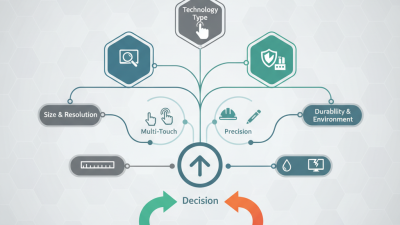
When selecting a capacitive touch screen, several key factors come into play. One major consideration is the screen size. It influences the user experience significantly. A larger screen may enhance visibility and interactivity.
However, it can also affect portability. Balancing size and functionality is crucial.
Next, the resolution matters. Higher resolution offers clearer images and better touch sensitivity. This aspect is particularly important for applications requiring precision.
Another factor is the touch technology. Multi-touch capability can enhance usability for various tasks. Finding a screen that recognizes gestures accurately can be challenging but essential.
Don't overlook the environmental factors. Consider where the touch screen will be used. Outdoor screens need to be more durable and brighter. In contrast, indoor screens may prioritize aesthetics. Lastly, affordability cannot be ignored. Price often varies significantly. It's essential to assess what features are worth the investment. Quality varies, and sometimes a more affordable option meets basic needs just as well.
Different Types of Capacitive Touch Screens Available
Capacitive touch screens come in various types, each catering to different needs. The most common type is the surface capacitive screen. It detects touch through the changes in capacitance at the screen’s surface. This type is responsive and works well with fingers. However, it may struggle with wet or gloved hands.
Another option is the projected capacitive touch screen. This technology offers enhanced sensitivity and accuracy. It senses multiple touches simultaneously. Ideal for applications requiring multitouch capabilities, it also performs well under different lighting conditions. Despite its advantages, projected capacitive screens can be more expensive and harder to repair.
Resistive touch screens are another alternative, though they work differently. They respond to pressure rather than touch. This makes them reliable in rugged environments. However, they usually lack the clarity and responsiveness of capacitive screens. Each type of capacitive touch screen has its pros and cons, making it essential to assess your specific requirements before making a decision.
Assessing Touch Sensitivity and Responsiveness
Touch sensitivity and responsiveness are crucial when choosing a capacitive touch screen. A highly sensitive screen reacts swiftly to light touches, providing a seamless user experience. Look for screens with low latency, as they register inputs without delay. This is especially important for applications requiring quick responses, like gaming or interactive displays.
When evaluating touch sensitivity, consider the material of the screen. Glass surfaces typically offer better responsiveness than plastic. The thickness of the screen also impacts how it interprets touch—thinner screens often provide better sensitivity. Pay attention to the touch accuracy as well. Some screens may register touches slightly off from where you intended. Testing multiple devices is key to finding what works best for you.
Understanding how different screens perform in various conditions can make a significant difference. For example, direct sunlight may affect visibility and responsiveness. If possible, test the screen both indoors and outdoors. This will help identify any weaknesses in sensitivity. Evaluate how the screen responds with different finger techniques, such as tapping versus swiping. This reflective process will guide you in selecting the best capacitive touch screen for your needs.
Evaluating Durability and Environmental Resistance
When selecting a capacitive touch screen, durability and environmental resistance are key factors. The lifespan of these screens can vary significantly based on materials and construction. For example, screens made from Gorilla Glass typically exhibit high resistance to scratches and impacts. Reports indicate that devices using such glass can endure drops from over 1 meter. An important consideration is IP ratings. An IP67 rating means the device can withstand immersion in water up to 1 meter for 30 minutes, making it suitable for diverse environments.
It's essential to consider the specific conditions where the screen will be used. For example, if the device is intended for outdoor use, choose a model with strong UV resistance and temperature stability. Certain coatings can enhance the screen's resistance to chemicals and oils. Industry estimates show that screens with anti-glare properties can improve visibility in direct sunlight by up to 30%.
Incorporating additional protective features like bezels can also be beneficial. These features can absorb shocks and prevent damage during accidental falls. Remember that these enhancements may add to the overall weight and thickness, so weigh the pros and cons.
Choose wisely based on the environment. Ensure you account for potential exposure to extreme temperatures and moisture. Screens designed for heavy-duty applications may come with a higher initial cost. However, the investment often pays off in increased longevity and reliability.