Best Usb Touch Monitor Options for Your Business Needs?
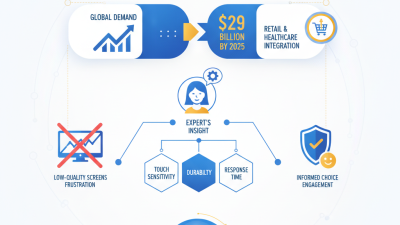
In today's fast-paced business environment, the demand for efficient and interactive displays is skyrocketing. According to a recent report by MarketsandMarkets, the global touch screen market is expected to grow from $45 billion in 2023 to over $70 billion by 2028. This growth is driven by the increasing need for intuitive user experiences. One solution that stands out is the USB touch monitor.
USB touch monitors offer seamless connectivity, making them a favorite among professionals. They can be easily integrated into various setups, from retail displays to office environments. However, not all USB touch monitors deliver the same quality. Businesses must consider factors like screen resolution, touch sensitivity, and durability. Reports from industry leaders emphasize the importance of reliability and response time in choosing the right monitor.
Yet, with so many options, making the right choice can be daunting. Some may opt for popular brands only to discover shortcomings in real-world applications. Thus, careful evaluation and consideration of user needs are essential. The challenge lies in balancing quality with budget constraints. Ultimately, investing in the right USB touch monitor can enhance productivity and improve customer engagement, making it a critical tool for modern businesses.
Understanding USB Touch Monitors and Their Benefits for Businesses
USB touch monitors have increasingly become vital tools in modern business environments. These devices allow for direct interaction, enhancing user engagement significantly. According to a report by Grand View Research, the global touchscreen market is expected to reach $84.3 billion by 2026. Such numbers indicate the growing importance of touchscreen technology in various sectors, including retail, hospitality, and education.
The benefits of using USB touch monitors are manifold. They offer superior ergonomics, reducing the strain associated with traditional input devices. Touchscreens can streamline workflows, as users can complete tasks more rapidly with direct touch. Research indicates that companies adopting touchscreen technology report a 25% increase in efficiency. However, businesses must consider potential challenges such as software compatibility and the need for regular updates to maintain functionality.
Incorporating USB touch monitors may also require initial investment and training. Some employees may not be accustomed to touch interfaces, leading to a learning curve. In addition, not all applications are optimized for touch use, which could result in a subpar experience. Being mindful of these aspects can lead to more effective integration of touchscreen technology into business operations.
Key Features to Look for in a USB Touch Monitor
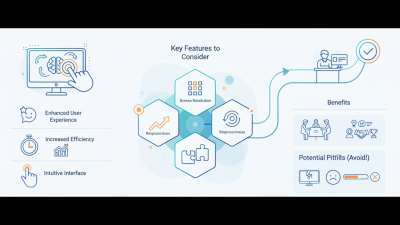
When selecting a USB touch monitor for business, certain features are paramount. Touch responsiveness matters greatly. A monitor with low latency ensures immediate feedback in interactive applications. Industry reports show that responsiveness boosts user engagement by 30%. That's a significant increase when every second counts in a business environment.
Display quality is another key consideration. A high-resolution screen enhances clarity and reduces eye strain. Monitors with at least 1080p resolution are ideal for tasks requiring precision. Research indicates that clearer displays can improve productivity by up to 20%. Additionally, the monitor's size and shape can affect usability. Larger screens promote collaboration, while compact models save space.
Durability is also vital. Touch monitors undergo frequent use, which can lead to wear and tear. Opting for models with robust construction can extend lifespan and reduce replacement costs. Some studies suggest that businesses could save 15% in costs by investing in higher-quality touch displays initially. Remember, while features are important, evaluating your specific needs can lead to better purchasing decisions.
Top USB Touch Monitor Brands and Their Offerings
When selecting the right USB touch monitor, it’s essential to consider the top brands in the market. Various manufacturers offer unique features that cater to diverse business needs. Some prioritize display clarity, while others focus on touchscreen sensitivity. Evaluating these aspects can enhance user experience and productivity.
One popular offering is the integration of advanced touch technologies. Many brands now provide multi-touch capabilities, allowing for more interactive use. Some monitors incorporate sleek designs, making them suitable for modern office environments. Durability is also a crucial factor; businesses ought to reflect on how robust the monitors are for daily use.
Additionally, exploring customer reviews can provide insights into the long-term performance of these monitors. It's valuable to consider feedback on customer service. Each brand has strengths and weaknesses. Assessing these factors helps ensure you invest in a product that meets your specific requirements.
Best USB Touch Monitor Options for Your Business Needs
| Screen Size |
Resolution |
Touch Technology |
Brightness (nits) |
Response Time (ms) |
Price Range |
| 15.6 inches |
1920 x 1080 |
Capacitive |
250 |
5 |
$200 - $300 |
| 23.8 inches |
2560 x 1440 |
Projected Capacitive |
300 |
6 |
$350 - $450 |
| 27 inches |
3840 x 2160 |
Infrared Touch |
350 |
4 |
$600 - $800 |
| 32 inches |
3840 x 2160 |
Capacitive |
400 |
8 |
$900 - $1200 |
Comparing Prices and Performance of Popular USB Touch Monitors
When selecting a USB touch monitor for business needs, consider both price and performance. Many options vary significantly in terms of features, screen size, and touch sensitivity. A balance between cost-effectiveness and functionality is crucial. For instance, cheaper monitors may lack advanced features, impacting usability. On the other hand, high-end models often justify their cost with superior graphics and faster response times.
Tips: Check the resolution before purchasing. A higher resolution enhances clarity and detail. Ensure the monitor’s touch technology aligns with your work style. Capacitive touch screens tend to be more responsive than resistive ones. Read user reviews to identify potential issues and benefits other buyers experienced.
Reflect on your specific requirements. Will you use the monitor for presentations or interactive kiosks? Each use case may necessitate different specifications. Different environments can affect performance, so consider if the monitor will be used in bright areas. Investigating the warranty and customer support can save headaches later.
How to Integrate USB Touch Monitors into Your Business Setup
Integrating USB touch monitors into your business setup can enhance productivity and improve customer engagement. These monitors are intuitive and responsive, making interaction seamless. When setting up, consider the size and resolution that best fits your workspace needs. Larger screens are beneficial for team presentations, while compact screens can be effective in retail environments.
It's important to ensure compatibility with existing systems. Check connectivity options and software compatibility before purchasing. User feedback is essential here; some setups may require adjustments. Certain features, such as multi-touch capability, can be useful in collaborative projects. These features may add complexity, so weigh the pros and cons carefully.
Training staff on the new technology can sometimes be overlooked. A well-structured training schedule can address this gap. Monitor responsiveness and user satisfaction over time. Gathering insights from your team can lead to continuous improvements. Overall, a thorough assessment of needs and limitations will guide you towards a successful implementation of USB touch monitors.